Using Minikube to Create a Cluster
Objectives
- Learn what a Kubernetes cluster is.
- Learn what Minikube is.
- Start a Kubernetes cluster on your computer.
Before you begin
This tutorial assumes that you have already installed minikube.
See minikube start for installation instructions.
Note:
Only execute instructions in step 1: Installation. The rest is covered in this tutorial.You also need to install kubectl.
See Install tools for installation instructions.
The shell commands in this tutorial use POSIX shell syntax, which is supported by
the default shells on most Linux and macOS systems (for example, bash, zsh, or sh).
Windows users must use a POSIX-compatible shell such as
Windows Subsystem for Linux (WSL)
or Git Bash to run the commands as written.
Commands that use export, $(), and similar constructs are not compatible
with PowerShell or the Windows Command Prompt.
Create a minikube cluster
minikube start
Check the status of minikube cluster
Verify the status of minikube cluster to ensure all the components are in a running state.
minikube status
The output from above command should show all components Running or Configured, as shown in the example output below:
minikube
type: Control Plane
host: Running
kubelet: Running
apiserver: Running
kubeconfig: Configured
Open the Dashboard
Open the Kubernetes dashboard. You can do this two different ways:
Open a new terminal, and run:
minikube dashboard
Now, switch back to terminal where you ran minikube start.
If you don't want minikube to open a web browser for you, run the dashboard subcommand with the --url flag. minikube output URL that you can open in the browser you prefer.
Open a new terminal, and run:
# start a new terminal, and leave this running
minikube dashboard --url
Now, you can use this URL and switch back to terminal where you ran minikube start.
Kubernetes Clusters
Kubernetes is a production-grade, open-source platform that orchestrates
the placement (scheduling) and execution of application containers
within and across computer clusters.
Kubernetes coordinates a highly available cluster of computers that are connected to work as a single unit. The abstractions in Kubernetes allow you to deploy containerized applications to a cluster without tying them specifically to individual machines. To make use of this new model of deployment, applications need to be packaged in a way that decouples them from individual hosts: they need to be containerized. Containerized applications are more flexible and available than in past deployment models, where applications were installed directly onto specific machines as packages deeply integrated into the host. Kubernetes automates the distribution and scheduling of application containers across a cluster in a more efficient way. Kubernetes is an open-source platform and is production-ready.
A Kubernetes cluster consists of two types of resources:
- The Control Plane coordinates the cluster
- Nodes are the workers that run applications
Cluster Diagram
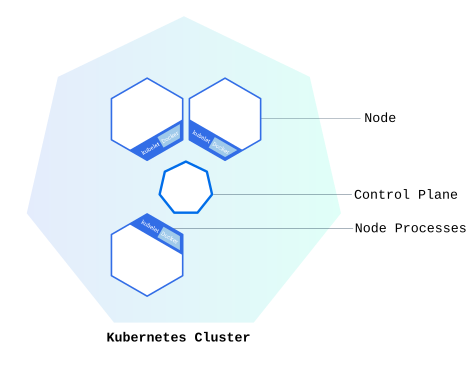
The Control Plane is responsible for managing the cluster. The Control Plane coordinates all activities in your cluster, such as scheduling applications, maintaining applications' desired state, scaling applications, and rolling out new updates.
Control Planes manage the cluster and the nodes that are used to host the running
applications.
A node is a VM or a physical computer that serves as a worker machine in a Kubernetes cluster. Each node has a Kubelet, which is an agent for managing the node and communicating with the Kubernetes control plane. The node should also have tools for handling container operations, such as containerd or CRI-O. A Kubernetes cluster that handles production traffic should have a minimum of three nodes because if one node goes down, both an etcd member and a control plane instance are lost, and redundancy is compromised. You can mitigate this risk by adding more control plane nodes.
When you deploy applications on Kubernetes, you tell the control plane to start the application containers. The control plane schedules the containers to run on the cluster's nodes. Node-level components, such as the kubelet, communicate with the control plane using the Kubernetes API, which the control plane exposes. End users can also use the Kubernetes API directly to interact with the cluster.
A Kubernetes cluster can be deployed on either physical or virtual machines. To get started with Kubernetes development, you can use Minikube. Minikube is a lightweight Kubernetes implementation that creates a VM on your local machine and deploys a simple cluster containing only one node. Minikube is available for Linux, macOS, and Windows systems. The Minikube CLI provides basic bootstrapping operations for working with your cluster, including start, stop, status, and delete.
What's next
- Tutorial Deploy an App.
- Learn more about Cluster Architecture.